Portino on Mac.
Introducing something new!
You've been asking us for a long time whether Portino would work on a Mac. Now we can finally answer: yes. The Demo version for Macs with Apple processors is ready to download, with the same painters, styles and the whole show as on Windows.

Your wish, granted
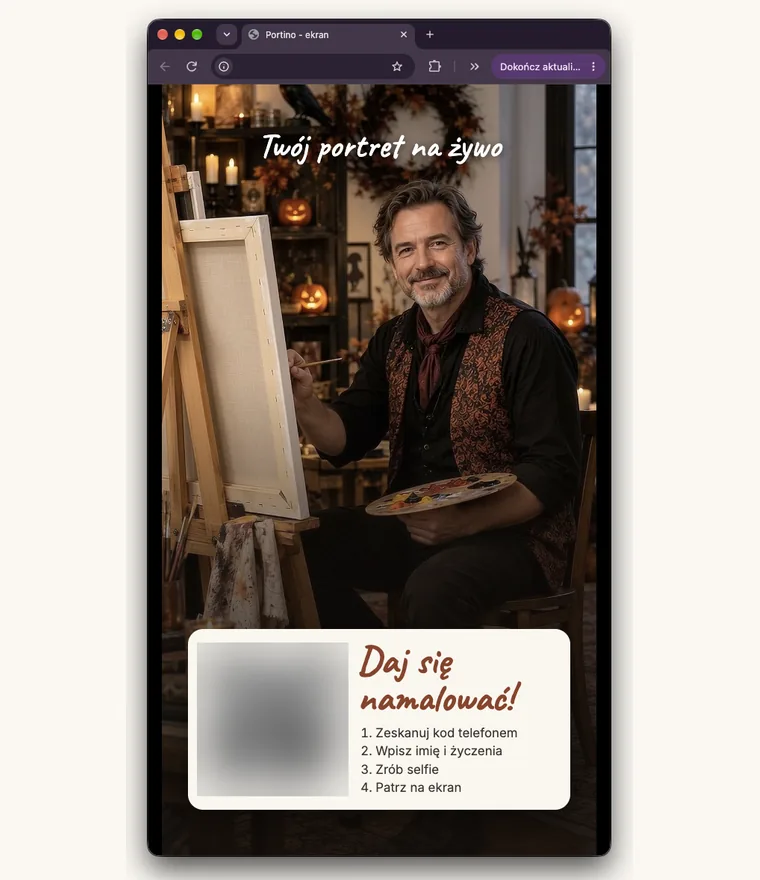
We see more and more MacBooks at events. Photo booth operators, event agencies, photographers - many of you work on a Mac every day and don't want to carry a second laptop just to run one program. We heard this question so many times that we finally stopped answering “maybe one day” and got to work.
The result? Portino now runs natively on Macs with Apple processors. No emulators, no virtual machines, no workarounds. Download, open, paint.
Everything you know from Portino
The Mac gets the full show, not a cut-down version:
- all the painters, including the seasonal ones - right now a Halloween-themed painter is waiting in the studio,
- all portrait styles: caricatures, charcoal, watercolour, oil, linocut, costumes and the Extra portrait,
- the 3D easel that turns towards the guests, drawing with pen and brush on paper, and the guest wall,
- a QR code on the screen: guests scan it with their phone, take a selfie and watch their portrait being created,
- the same account and the same credits as on portino.pl - you log in just like on Windows.
The panel opens in your browser, and you show the guest screen on a second monitor or a TV. Exactly like on Windows.
The same portraits, the same quality

The portraits are painted by the Portino server, so it doesn't matter whether your station runs on a Mac or on Windows. A big-headed caricature, a charcoal sketch, an oil painting with thick brushstrokes - guests get exactly the same result, in a dozen or so seconds per portrait.
Your MacBook doesn't have to break a sweat. You don't need a powerful graphics card, and the fans won't be running at full speed. The Mac just runs the show, and the server does the heavy lifting.
What you need
- a Mac with an Apple processor: M1, M2, M3, M4, M5 or newer,
- macOS 14 Sonoma or later,
- an internet connection - the portraits are painted by the Portino server, just like in the Windows version.
How to get started
Create an account on portino.pl. In the activation email you'll find a link to Portino Demo for Mac - with 15 free portraits to start with. Download the Portino_Demo.dmg file and follow the installation steps below. It will take you two minutes.
Installing on a Mac, step by step
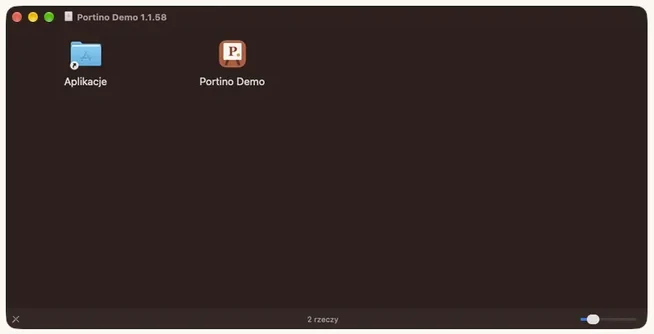
Portino is signed and checked by Apple, so you install it like any other program on your Mac - without changing any security settings.
- Step 1. Double-click the downloaded Portino_Demo.dmg file. A window opens with the Portino Demo icon and the Applications folder. Drag Portino Demo onto the Applications folder.
- Step 2. Open the Applications folder and double-click Portino Demo. If macOS asks whether to open an app downloaded from the Internet, click “Open”.
That's it. Portino starts in the background and opens the panel in your browser. Log in with your portino.pl account and you're ready to go. Next time, just click the Portino Demo icon in Applications.
Demo first, full version coming soon
We're starting with the Demo version so you can try Portino on your Mac at your own pace - on your own screen, with your own guests. The full version for Mac is on its way.
Have a Mac and an idea for what else we could add to Portino? Write to us at portinopolska@gmail.com or in the chat on our website. This version exists precisely because you asked - so keep asking.